
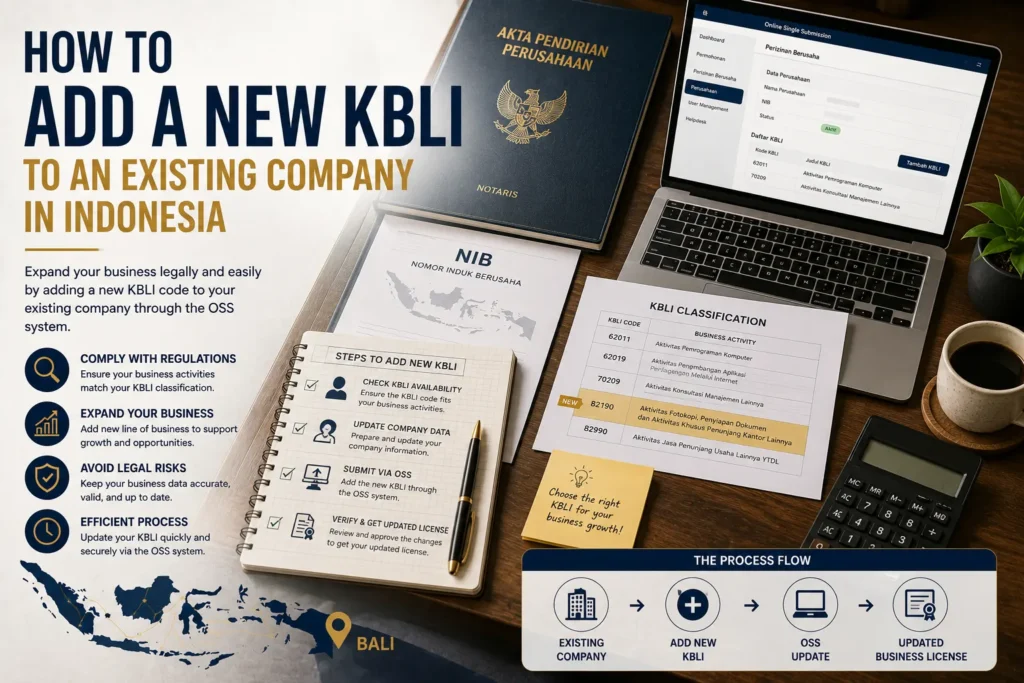
Adding a KBLI to an existing Indonesian company is not always a simple edit to the NIB. First verify the new activity against the current KBLI classification, then check whether the company’s existing purposes and activities already cover it, and only then determine the correct OSS licensing workflow.
That distinction matters because adding another business activity is different from changing an existing KBLI. Current OSS guidance provides a workflow for adding a new Kegiatan Usaha and Bidang Usaha, while a separate OSS guide states that the ordinary Perubahan Data Usaha menu cannot be used to change a KBLI.
How to Add a New KBLI to an Existing Company in Indonesia: Three Checks First
If you are researching how to add a new KBLI to an existing company in Indonesia, use this sequence:
- Identify the business activity the company will actually conduct and verify the current KBLI
- Compare that activity with the PT’s existing purposes, objectives and activities
- Add the new business activity through the applicable OSS licensing workflow and complete the requirements generated for that activity
Do not begin by choosing a code only because another company uses it. The classification needs to match the actual activity, and the new activity may have consequences for corporate documents, location requirements, risk level and supporting permits.
1. Confirm the Correct KBLI 2025 Activity
Before adding an activity, check the activity against the current OSS KBLI directory, which is presented as KBLI 2025, rather than choosing a code only because it appeared in an older company document or article.
Search by both code and activity description. The important issue is not only whether the title sounds appropriate, but whether the detailed description reflects what the company will actually do.
A practical activity description should answer questions such as:
- What product or service will the company provide?
- Who is the customer?
- Is the company producing, trading, renting, operating, managing or consulting?
- Is the new activity independent from the company’s existing activity?
- Will it operate at the same location or another location?
- Does the activity fall within a regulated sector?
This step reduces the risk of selecting a classification based on a broad commercial label that does not match the actual operating model.
2. Check Whether the Company’s Articles Already Cover the Activity
For a PT, OSS is not the only system to review. The company’s corporate purposes and activities may also need to be considered.
The AHU Limited Liability Company guidance states that business fields refer to KBLI and lists changes to a PT’s purposes, objectives and activities among amendments requiring approval of the articles of association.
When a Corporate Amendment May Be Needed
A new KBLI does not justify a blanket statement that every company must amend its deed. The correct question is whether the proposed activity is already covered by the company’s existing purposes, objectives and activities.
If the new activity requires those corporate provisions to change, the same AHU guidance describes a process involving a General Meeting of Shareholders, recording the change in a deed and processing the amendment through the AHU database.
A useful pre-OSS check is therefore:
- Review the latest deed and approved corporate amendments
- Identify the company’s existing purposes and activities
- Compare them with the proposed new activity
- Determine whether a corporate amendment is required before relying on the new business field operationally
This is especially important where the new activity is materially different from the company’s original business model.
Bali Legal ID’s Business Setup service includes NIB OSS RBA Registration alongside PT PMDN Setup, PT PMA Setup and Business Closure, which can be relevant where the new activity creates both corporate and licensing workstreams.
3. Add the New Business Activity Through the OSS Licensing Workflow
Once the corporate position and the correct activity are clear, the next question is how the new activity enters the OSS licensing process.
In the current OSS business licensing guide for low and medium-low risk activities, the workflow under Kelola Usaha includes selecting Kegiatan Usaha, choosing Tambah Kegiatan Usaha, selecting the relevant business field and using Tambah Bidang Usaha before completing the activity data.
The guide then requires the business actor to continue through project-specific information rather than merely adding a code to a list.
A simplified decision sequence is:
- Log in to the company’s OSS account
- Open the Business Licensing or Perizinan Berusaha area
- Use Kelola Usaha and proceed to Kegiatan Usaha
- Select Tambah Kegiatan Usaha for the additional activity
- Select the relevant business field and scope
- Add the selected Bidang Usaha
- Complete the location and business information requested by OSS
- Complete the project, investment, workforce and product or service information applicable to the activity
- Allow OSS to determine the risk and licensing path based on the submitted data
- Complete spatial-planning, environmental or licensing requirements that the system generates where applicable
This sequence is a guide to the current general OSS workflow, not a guarantee that every sector or risk category will display identical screens or requirements.
The national licensing framework is currently governed by Government Regulation No. 28 of 2025, which JDIH BKPM lists as in force.
Adding a New Activity Is Not the Same as Changing an Existing KBLI
This is one of the most important distinctions for an existing company.
Do not confuse adding another business activity with changing an existing KBLI: the current OSS Business Licensing Changes – Business Data guide expressly states that the ordinary Perubahan Data Usaha menu cannot be used for a KBLI change and then describes cancellation or non-liquidation revocation routes depending on the licensing status.
The guide states that where a medium-high Standard Certificate has not yet been verified and/or a high-risk permit has not yet been issued, a KBLI change may be handled through the cancellation application route. Where the relevant Standard Certificate has been verified and/or high-risk permit has already been issued, it points to non-liquidation revocation. Removal of a KBLI is also directed to the revocation menu.
This means you should identify which of these situations you actually have:
- Adding another activity: the company wants to keep its existing KBLI and add a separate business field
- Changing an activity: the existing KBLI is incorrect or no longer reflects what the project will do
- Removing an activity: the company wants to discontinue an existing KBLI
- Updating details within an existing activity: the KBLI remains the same, but location, investment, product/service or other project data changes
Using the wrong category can send the company into the wrong OSS workflow.
What Information OSS May Ask for
A new KBLI is not only a classification entry. The additional activity can generate new project-level questions.
After the business field and project information are entered, the current OSS licensing guide shows subsequent steps involving location and spatial-planning requirements, business data, risk validation and environmental information.
Depending on the activity and project, information may include:
- Business location
- Land or premises information
- Business name or project name
- Investment data
- Workforce information
- Product or service information
- Business activity description
- Risk validation
- Spatial-planning information
- Environmental information
Higher-risk or sector-specific activities can involve additional requirements. The current guide used here is specifically a low and medium-low risk workflow, so a company should not assume that the same final licensing output applies to a medium-high or high-risk activity.
Bali Legal ID’s NIB OSS RBA Registration service is the closest existing service page where an owner needs assistance with business classification and the OSS licensing process.
New KBLI Decision Matrix
Use the table below to determine which issue should be resolved first before making changes in OSS.
| Situation | First check | Likely workstream |
|---|---|---|
| Add a completely new activity | Does the deed already cover the activity? | Corporate review plus new OSS business activity |
| New activity is already covered by corporate purposes | Is the current KBLI 2025 selection correct? | OSS business licensing workflow |
| Existing KBLI is wrong | What is the current licensing status? | OSS KBLI-change route, not ordinary data change |
| Existing KBLI should be removed | Is the activity still tied to active licensing? | OSS revocation review |
| Activity stays the same but location changes | Is the KBLI unchanged? | Business-data and location review |
| New KBLI is in a regulated sector | What additional standards or permits apply? | Sector-specific licensing review |
| Foreign-owned PT adds another activity | Is the activity compatible with the investment structure? | PT PMA and activity-specific review |
The practical implication is that the phrase “add a KBLI” can hide several different legal and licensing tasks. Correctly identifying the task before editing the OSS account is more important than following a generic click-by-click tutorial.
Common Mistakes When Adding a KBLI
Choosing a Code From an Old List
The current OSS directory displays KBLI 2025. Verify the current description instead of assuming a code used in older material is still the correct classification.
Updating OSS Without Reviewing the Deed
If the company’s purposes and activities need to change, the corporate amendment should not be ignored simply because an OSS workflow is available.
Treating a New Activity as a Change to an Existing KBLI
Adding another business field and replacing an existing KBLI are different tasks under current OSS guidance.
Assuming the NIB Alone Completes the New Activity’s Licensing
The selected activity can generate risk-based, spatial, environmental or sector-specific requirements. Review the actual OSS output for the project.
Copying Another Company’s KBLI
Two businesses that use similar marketing language can perform different legal activities. Select the code according to the company’s actual operation.
Ignoring the Location
A new activity at a different location can create additional project and spatial-planning questions. Confirm the location before completing the licensing workflow.
Pre-Submission Checklist
Before adding a new activity, confirm the following:
- Describe the new activity precisely. State what the company will actually sell, produce, operate or provide.
- Check the current KBLI 2025 directory. Match the activity to its current title and description.
- Review the latest corporate deed and amendments. Determine whether the company’s purposes and activities already cover the proposed business.
- Complete any necessary corporate amendment first. Do this where the company’s purposes or activities actually need to change.
- Review the company’s existing OSS activities. Confirm whether you are adding a new activity, changing an existing KBLI or updating project data.
- Prepare the new activity’s location and project information. Include the information needed for OSS risk and licensing assessment.
- Review the generated licensing requirements. Do not assume that obtaining or updating the NIB is the final requirement for every activity.
- Check investment restrictions or sector rules where relevant. This is particularly important for foreign-owned companies or regulated activities.
For broader context on company establishment and OSS licensing, Bali Legal ID also maintains a Business Setup Bali guide.
Conclusion
Adding a new KBLI to an existing company requires more than selecting a code in OSS. Start by confirming the correct KBLI 2025 activity, compare it with the company’s existing corporate purposes and activities, and then identify the correct OSS task.
If the company is genuinely adding another activity, the current OSS licensing workflow includes adding a new Kegiatan Usaha and Bidang Usaha. If the company is replacing or removing an existing KBLI, current OSS guidance directs those changes through different procedures depending on the licensing status.
The safest sequence is therefore corporate review first, classification second and OSS licensing third. That keeps the company’s legal documents, actual business activity and licensing data aligned before the new operation begins.
Check the Corporate and OSS Position Before Adding the Activity
If your company is adding a new activity, first determine whether the issue is a corporate amendment, a new OSS business activity, a change to an existing KBLI, or a combination of those steps.
Discuss the proposed activity with Bali Legal ID or review its NIB OSS RBA Registration service when you need assistance matching the business activity with the relevant company and OSS workstream.
For help coordinating the records and next steps discussed above, review our NIB and OSS RBA registration services in Bali.
Read More: OSS RBA Registration Bali: Complete Guide for Businesses and Foreign Investors
FAQ How to Add a New KBLI to an Existing Company in Indonesia
Can an existing PT add another KBLI?
Potentially yes, but first check whether the new activity is already covered by the PT’s purposes and activities and whether the selected KBLI accurately reflects the new operation. If the corporate purposes need to change, an AHU and notarial amendment may need to be handled before or together with the OSS licensing work.
Do I need to create a new NIB when adding another business activity?
Do not assume a new company or separate NIB is automatically required. Current OSS licensing workflows allow business actors to manage activities under Kelola Usaha and add Kegiatan Usaha. The actual licensing output should be checked for the additional activity.
Is adding a KBLI the same as changing a KBLI?
No. Adding another activity keeps the existing activity and introduces a new business field. The current OSS change-data guide expressly states that its ordinary Perubahan Data Usaha menu cannot be used for a KBLI change and provides different routes for changing or removing an existing KBLI.
Which KBLI version should I check in 2026?
The current OSS KBLI directory checked on 21 August 2026 is presented as KBLI 2025. Use the live OSS classification and activity description when reviewing a new business field.
Does every new KBLI require a notarial deed amendment?
Not automatically. The relevant question is whether the company’s existing purposes, objectives and activities already cover the new activity. AHU guidance treats changes to purposes, objectives and activities as amendments requiring approval, so the latest corporate documents should be reviewed first.
Can a new KBLI create additional licensing requirements?
Yes. The OSS licensing workflow can generate requirements based on the selected activity, project data, risk level, location and other factors. The NIB should not be assumed to be the only requirement for every new activity.
References & Sources
- OSS RBA – Indonesia Standard Classification of Business Fields (KBLI) 2025
- OSS – Panduan Perizinan Berusaha Risiko Rendah / Menengah Rendah
- OSS – Panduan Perubahan Perizinan Berusaha – Data Usaha
- JDIH BKPM – Government Regulation No. 28 of 2025 on Risk-Based Business Licensing
- Directorate General of General Legal Administration – Limited Liability Company FAQ
- Bali Legal ID – NIB OSS RBA Registration
- Bali Legal ID – Business Setup Bali Guide